
Issue
After activating TruAge on a Verifone POS, the scanner fails to scan Driver's Licenses or the TruAge QR code.
Cause
This error occurs when the Datalogic 2D scanner is not programmed correctly.
Resolution
Reprogram and reconnect the Datalogic 2D scanner using the steps below.
Step 1: Reset Scanner to Defaults
(Optional): Scan this barcode to restore the scanner to factory defaults before
programming.
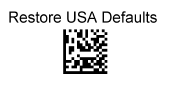
Step 2: Program Scanner for Needed Elements
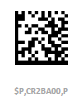
Scan the following barcode only and then test your scanner in your system software
by scanning an item. If you see the item show up, then the scanner is ready for use, if
not then see step 3 below.

Interface = RS232
Baud Rate = 9600
Handshaking = Xon/Xoff
Label ID = Enabled
Expand UPC-A to EAN13
Expand UPC-E to UPC-A
PDF417 ID = X
Code 128 ID = D
GS1 128 ID = D
QR Code ID = K
Step 3: (Only If Needed) - Program Scanner for 1200 baud
Scan the barcode below to change the speed of the connection. Then try scanning an
item again. You should now see the item in your system software.
Baud Rate = 9600
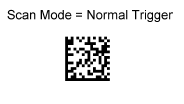
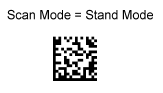
Step 4: (Optional) - Program Scan Mode
Choose Only One
Applies to: Verifone POS, Datalogic GD4500 2D Scanner, TruAge activation