
Issue
After activating TruAge on a Verifone POS, the scanner fails to scan Driver's Licenses or the TruAge QR code.
Cause
This error occurs when the Zebra 2D scanner is not programmed correctly.
Resolution
Reprogram and reconnect the Zebra 2D scanner using the steps below.
Step 1: Reset and Reprogram the Scanner
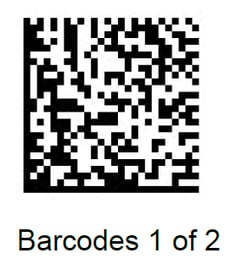
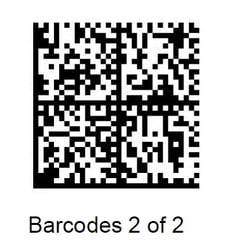
Scan these two barcodes in order to program the Zebra DS9208 and DS9308 scanners to scan the DL and the TruAge QR Codes.
Applies to: Verifone POS, Zebra DS9208 and DS9308 2D Scanner, TruAge activation